Background
Editing mathematical formulas is a tedious task. To address this, the HURRICANE team is preparing software for editing mathematical formulas. In addition to basic functions, the software will implement input for fractions and matrices. As designed, the software should be user-friendly, maximizing convenience for input, even though the cost of software development is quite high. Fortunately, the input methods and formats have already been defined; you only need to write a processing program. Below are the relevant conventions and formats:
Formatting Concepts
| Element | Description |
|---|---|
| Elements | Elements can be operators, parentheses, numbers, letters, matrices, or fractions. |
| Numbers, Letters, and Parentheses | Numbers include '0'..'9', '.'. Letters include 'A'..'Z', 'a'..'z'. Parentheses include '(', ')'. They all occupy only one line, and this line is also the alignment line. |
| Expressions | A sequence of 0 to at most 500 elements. Among these, the total number of matrix and fraction elements does not exceed 30. |
| Edit Box | A rectangular area for inputting an expression. Each edit box includes an alignment line used for alignment between edit boxes. We define the width of an edit box as the number of characters in the longest line (e.g., 0 when the expression is empty), and the height as the number of lines between the highest and lowest lines (inclusive), with a minimum of 1, even if the expression is empty. |
| Alignment Line | A specific line within an edit element. This line is used for internal alignment of expressions and alignment between them. Alignment requires that the alignment line of the elements within the expression be placed on the alignment line of the edit box. |
| Operators | The four operators '+', '-', '*', '/'. To distinguish '-' (minus sign) from a fraction line, add an empty column on both sides of '-'. |
| Matrix | A $m \times n$ ($1 \le m \le 10, 1 \le n \le 10$) matrix contains $m \times n$ edit boxes, dividing the matrix into $m$ edit columns and $n$ edit rows. In the same edit row of the matrix, the alignment lines of adjacent edit boxes are aligned. Edit boxes in the same edit column are centered according to their width. It must be guaranteed that there is at least one empty row between rows and at least one empty column between columns. The first column on the left and the last column on the right of each row have a '[' and ']', located on the alignment line of each row's expression, as shown in the figure: |
Graphical representation
If the number of edit rows $n$ of the matrix is odd, the alignment line of the matrix is the alignment line of the edit box in the middle edit row; otherwise, it is the empty row between the two middle edit rows.
| Element | Description |
|---|---|
| Fraction | A fraction consists of two edit boxes (numerator and denominator) and a fraction line between them. The fraction line is a character sequence composed of '-', which is also the alignment line of the fraction. The width of the fraction is the maximum of the widths of the two edit boxes plus 2, i.e., adding a '-' on both the left and right sides; the height is the sum of the heights of the two edit boxes plus the height of the fraction line, which is 1. The two edit boxes are centered. As shown in the figure: XXXX XX ------ -------- XXX XXXXXX When centering, if they cannot be perfectly aligned, shift to the left by half a character, like the denominator edit box on the left in the figure above. |
Cursor Control
It should be noted that edit boxes can be nested layer by layer, such as a matrix within an edit box, and several edit boxes within a matrix. We say that this edit box is one level higher than the edit boxes of the matrix, and the edit boxes within the matrix are at the same level; the two edit boxes of a fraction are also at the same level. Note: "Same level" only refers to edit boxes within a single matrix or a single fraction.
The cursor can jump to the beginning and end of an edit box, and can also move in four directions. Let the lowest-level edit box where the cursor is located be $A$.
- If the cursor jumps to the beginning (end) of an edit box, it is placed at the front (end) of $A$.
- When moving the cursor up/down:
- If there is an edit box $B$ at the same level as $A$ above (below) $A$, the cursor is placed at the front of $B$.
- Otherwise, compare with the edit box one level higher than $A$ and perform the same judgment. If $A$ is the highest-level edit box, no action is taken.
- When moving the cursor left (right):
- If the cursor is at the front (end) of $A$:
- If there is no edit box at the same level to the left (right), the cursor returns to the edit box one level higher (if it is the highest level, no action is taken), and is placed on the left (right) side of the matrix or fraction.
- If there is an edit box $B$ at the same level to the left (right), it is placed at the end (front) of $B$.
- If there is a matrix or fraction to the left (right) of the cursor:
- If it is a fraction, the cursor is placed at the end (front) of the numerator edit box.
- If it is a matrix, it is placed at the end (front) of the edit box in the $m$-th column, $\lceil n/2 \rceil$-th row (1st column, $\lceil n/2 \rceil$-th row).
- If there is another element to the left (right) of the cursor, the cursor moves one space to the left (right).
- If the cursor is at the front (end) of $A$:
Operation Events
The program implements input through a series of events, each of which has been converted into a string:
If the string contains only one character, it is an operator, parenthesis, number, or letter. The program inserts this character at the cursor position, and then the cursor moves one space to the right.
If the string is Matrix or Fraction, a $1 \times 1$ matrix or fraction is inserted at the cursor position, and the cursor moves one space to the right.
If the string is AddRow or AddCol, a row of edit boxes or a column of edit boxes is inserted before the edit box where the cursor is located within the matrix, and the cursor is placed in the newly inserted row (column). If the cursor is not within any matrix, no action is taken.
The strings Home, End, Left, Right, Up, Down represent placing the cursor at the beginning or end of the edit box, or moving the cursor one space left, right, up, or down, respectively.
Note: Since this software is only used for inputting expressions and does not perform any processing on the expressions, the input expressions may not be correct.
Task
You need to provide the output that satisfies the problem requirements based on the given input: The input contains a sequence of operations as described above. The sequence may include the insertion of operators, parentheses, numbers, letters, matrices, or fractions, as well as cursor movement controls. You need to complete the input of the expression based on the input sequence of operations; we assume the initial expression is empty. * Then you need to print this expression in the output file using our agreed-upon format. Note that there should be no trailing spaces in the expression.
Each line contains a string representing an event, until the end of the file. We assume the scale of the matrix does not exceed $10 \times 10$, and the total number of elements does not exceed 10,000.
Output the result of the edit box in the specified format, filling in empty spaces with spaces. There should be no extra spaces at the end of each line. Keep a carriage return at the end of the last line.
Examples
Input 1
-
5
Fraction
1
Down
6
Right
*
Matrix
AddCol
AddCol
1
Right
2
Right
3
Right
*
Matrix
AddRow
AddRow
1
Down
2
Down
3
Output 1
 [1]
 1
 - 5---*[1 2 3]*[2]
 6
 [3]
Input 2
1
+
Fraction
1
Down
1
+
Fraction
1
Down
1
+
Fraction
1
Down
x
Up
Up
Right
Right
Home
Up
End
+
2
-
2
Output 2
 1+2 - 2
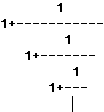
1+-----------
 1
 1+-------
 1
 1+---
 x