QOJ.ac

QOJ

時間限制: 1 s 記憶體限制: 1024 MB 總分: 100

#3112. 识别地图瓦片

统计

像 Bing Maps 和 Google Maps 这样的地图网站通常将地图存储为许多不同的图像文件,称为瓦片(tiles)。最低缩放级别(级别 0)由一张包含整张地图低细节图像的瓦片组成,缩放级别 1 由四张瓦片组成,每张瓦片包含地图四分之一的稍详细版本,通常缩放级别 $n$ 包含 $4^n$ 张不同的瓦片,每张瓦片包含地图的一部分。

识别瓦片的一种方法是使用四分键(quadkey)。四分键是一个数字字符串,用于唯一标识特定缩放级别下的瓦片。第一个数字指定瓦片位于整张地图的四个象限中的哪一个:0 代表左上象限,1 代表右上象限,2 代表左下象限,3 代表右下象限。后续数字指定瓦片位于当前象限的哪个子象限中。缩放级别 1 到 3 的四分键如图 I.1(a) 所示。
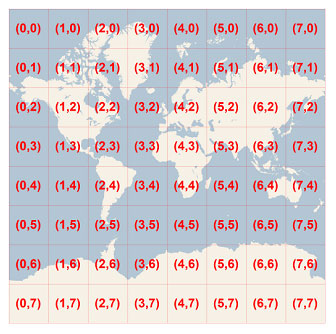
图 I.1:两种表示法的可视化。图片取自 MSDN。

识别瓦片的另一种方法是给出缩放级别以及 $x$ 和 $y$ 坐标,其中 $(0, 0)$ 是左上角。缩放级别 3 的瓦片坐标如图 I.1(b) 所示。给定一个瓦片的四分键,输出该瓦片的缩放级别以及 $x$ 和 $y$ 坐标。

输入格式

输入包含: * 一行字符串 $s$ ($1 \le \text{length}(s) \le 30$),即地图瓦片的四分键。

字符串 $s$ 仅由数字 ‘0’、‘1’、‘2’ 和 ‘3’ 组成。

输出格式

输出三个整数,即瓦片的缩放级别以及 $x$ 和 $y$ 坐标。

样例

输入格式 1

3

输出格式 1

1 1 1

输入格式 2

130

输出格式 2

3 6 2

Discussions

About Discussions

The discussion section is only for posting: General Discussions (problem-solving strategies, alternative approaches), and Off-topic conversations.

This is NOT for reporting issues! If you want to report bugs or errors, please use the Issues section below.

Open Discussions 0
No discussions in this category.

Issues

About Issues

If you find any issues with the problem (statement, scoring, time/memory limits, test cases, etc.), you may submit an issue here. A problem moderator will review your issue.

Guidelines:

  1. This is not a place to publish discussions, editorials, or requests to debug your code. Issues are only visible to you and problem moderators.
  2. Do not submit duplicated issues.
  3. Issues must be filed in English or Chinese only.
Active Issues 0
No issues in this category.
Closed/Resolved Issues 0
No issues in this category.